The Olio Model One smartwatch was the flagship product of startup Olio Devices, Inc. Olio Devices was founded around August 2013, and the Model One was revealed on March 26, 2015. It started shipping to customers by November 2015, and continued being sold through the end of 2016. Olio Devices was acquired in January 2017 by Flex, Ltd., Olio's contract manufacturer and one of their investors. Olio Devices ceased operations at this time.
The Olio Model One, internal platform name H1, uses a Texas Instruments AM3703 Sitara SoC: ARM Cortex-A8, no GPU or hardware video encoding/decoding, OMAP3 family. This is paired with 512 MiB LPDDR and 1 GiB raw NAND, in a single chip mounted on top of the SoC in a package-on-package (PoP) configuration.
Other hardware includes an ILI9342 display controller, LM3530 backlight controller, Maxtouch touch controller, TPS65910 PMIC, BCM20702 Bluetooth controller, BQ27421 gas gauge, LSM6DS3 accelerometer, DRV2605 haptic controller, TUSB1211 USB controller, and a 1.14 Wh lithium-ion polymer battery.
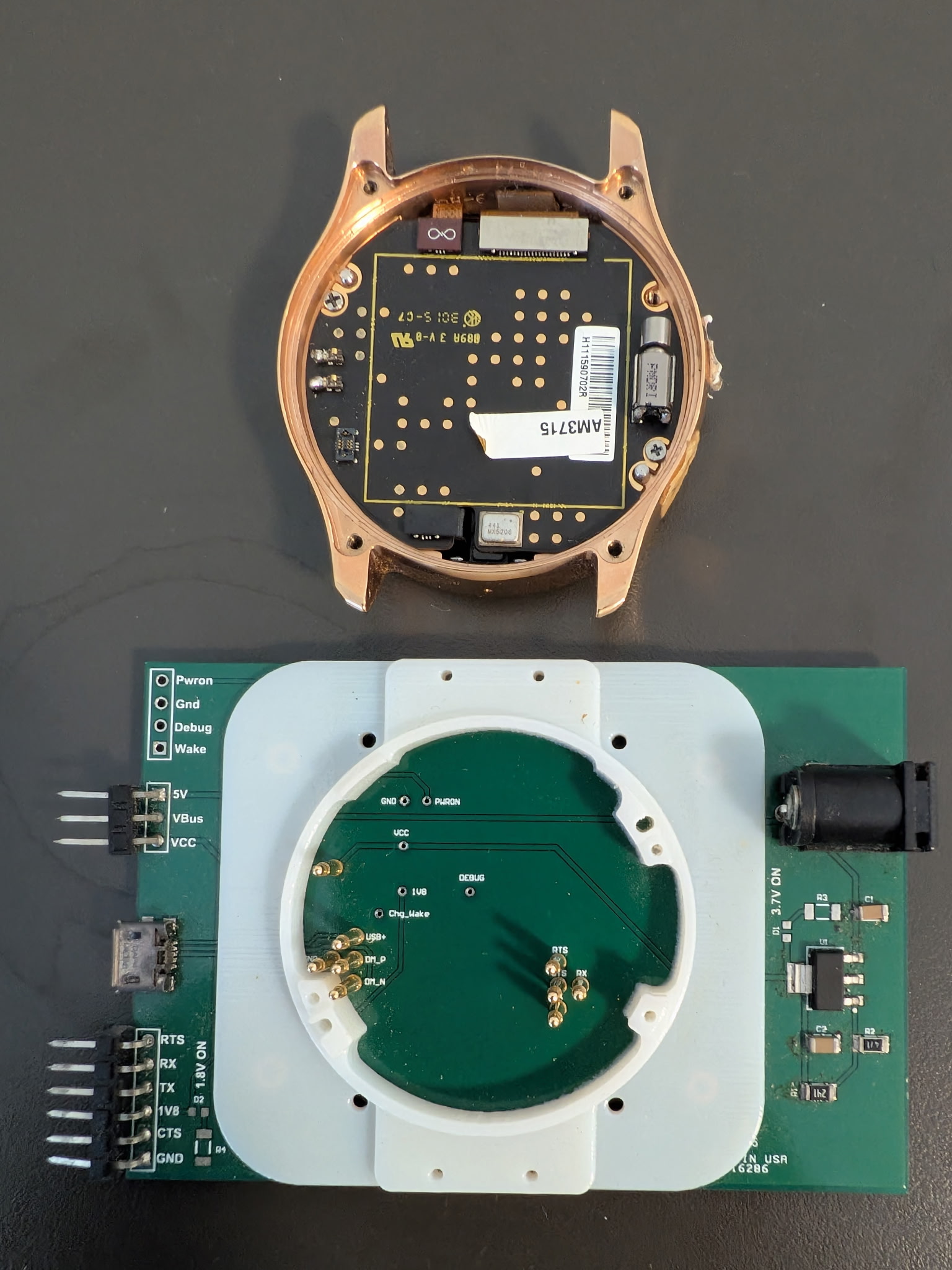
47 test pads are present on the back of the Olio's motherboard. UART, USB, and JTAG are accessible through these test pads. The battery covers up most of these test pads and must be removed to access them.
This image shows the debug cradle used by Olio Devices to access UART and USB on the Olio. The locations of those pins can be seen in this image.
The Olio ships with Android KitKat 4.4.4, with Linux kernel 3.10 and U-Boot 2014.01.
The standard Android UI is not normally visible to the user. Instead, the user normally only sees the Experiments app (Experiments-debug.apk, com.olio.experiments). This is a custom Android app implementing the Olio's UI. Originally, Experiments also handled Bluetooth communications, but this was later split to BluetoothClient (BluetoothClient-debug.apk, com.olio.bluetoothancs).
The Olio also includes a Buildroot initramfs that was used for various purposes, such as kernel bringup, factory tests, and certain low-level updates that couldn't be done with a running Android system. The root password on this Buildroot system is olio.
Bluetooth is the Olio's only significant I/O method, as it lacks WiFi or any external ports.
The Olio uses different protocols to communicate with the Android and iOS versions of the Olio Assist app. Communications with the Android version of the app consist of serialized Java objects over RFCOMM. The phone acts as the RFCOMM server and advertises a service with UUID 11e63bf3-6baa-47d9-b31d-6045138c9add over SDP. The iOS app, meanwhile, uses MessagePack over BLE.
Firmware updates consist of a ZIP archive sent over this protocol. This archive gets extracted to /data/media/0/olio/firmware_updates_apply, upon which the Olio will reboot. When booting, /system/vendor/bin/olio_fb_setup.sh will check for /data/media/0/olio/firmware_updates_apply/update.sh, and execute it if it exists. This file will be ran on each boot, and must delete itself if that's not desirable. The Olio's last firmware update can be found here.
I developed PyOlio, a program that reimplements the Android RFCOMM version of the protocol, including support for firmware updates. You can also run the Olio Assist app in an Android x86 virtual machine. I have tested this with Android x86 7.1. You will need to set up fakolio, a reimplementation of the API server originally at api.oliodevices.com. At first, the Assist app will crash on Android x86 due to libJsonSuperPack.so, an ARM binary. This library converts JSON to MessagePack and back, and is used on the Olio when connected to iOS. It is not used by the Android Olio Assist app, and is only present there because it and BluetoothClient-debug.apk were built from a shared codebase. To mitigate this crash, go to system settings, Android-x86 options, and select "Enable native bridge". This will install Houdini on your Android x86 system, which provides ARM binary emulation. Alternatively, since libJsonSuperPack.so isn't actually used, you could put a dummy x86 library in its place.
The main aspect of my work with the Olio is running modern Linux on it.
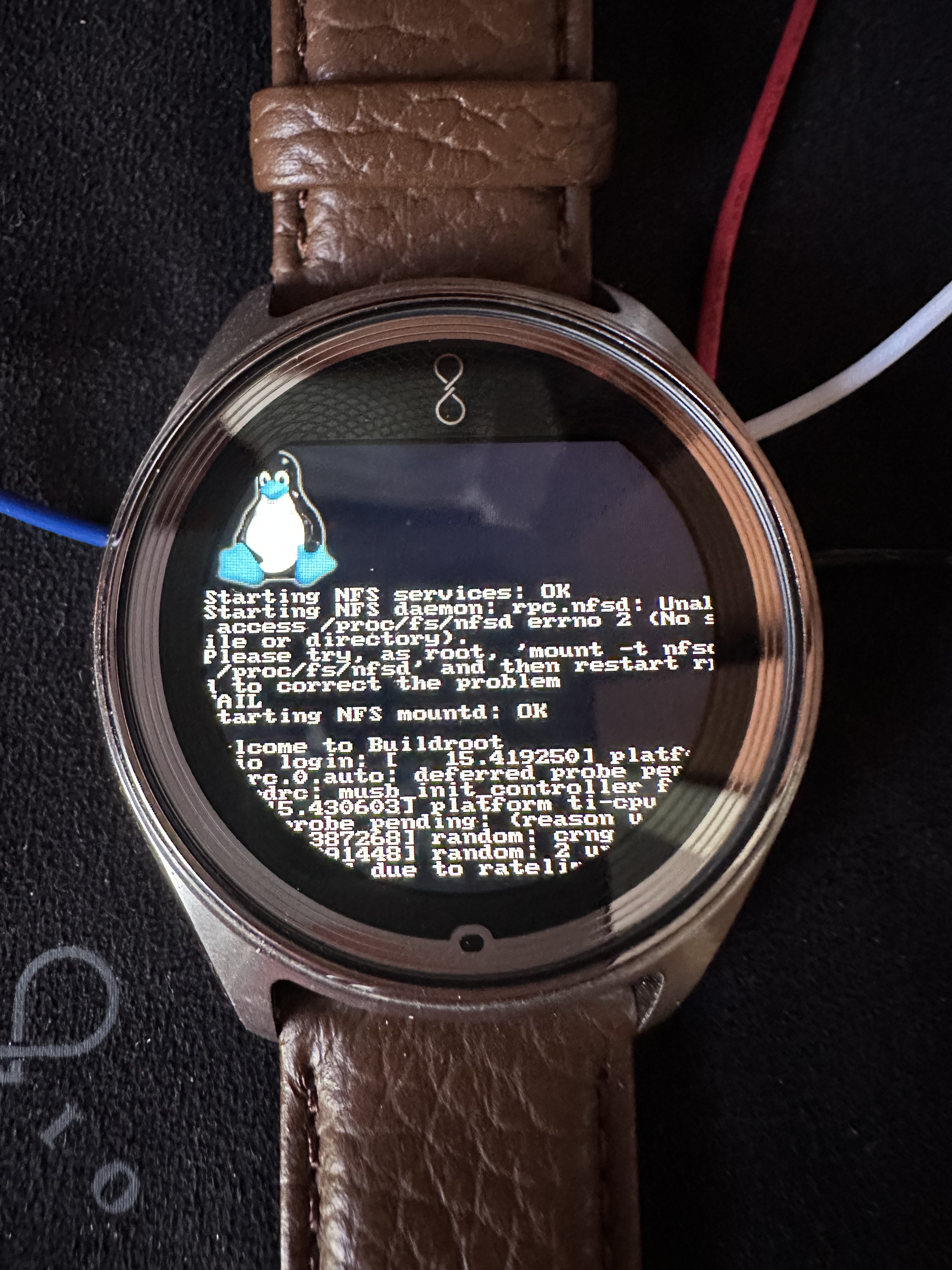
All of my work will be released here when complete. In the meantime, feel free to contact me with any questions or comments.
Last updated: 2026-10-15